
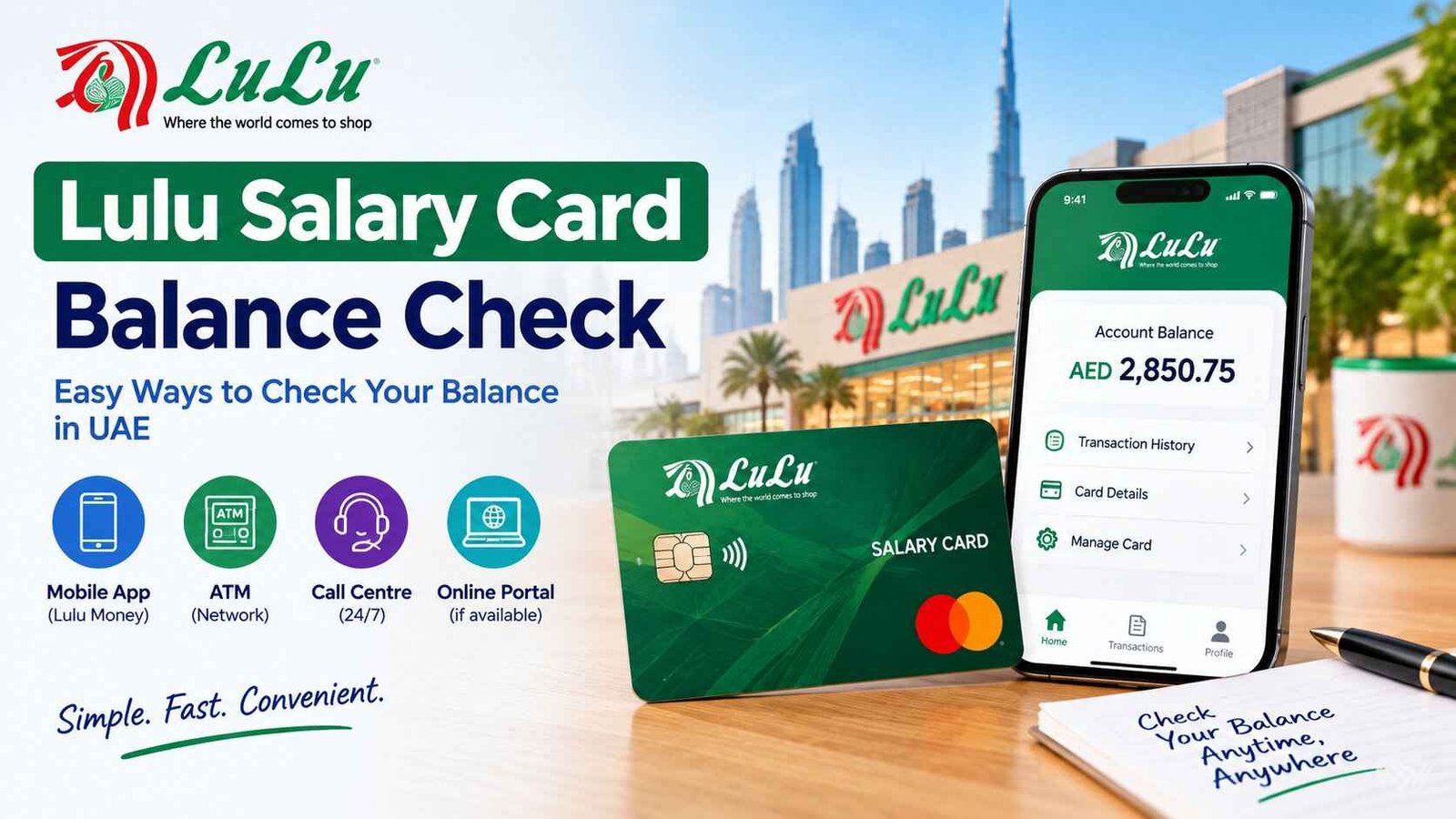
Lulu Salary Card Balance Check UAE: App, ATM, Phone Number and Fixes
Payday rumours travel faster than the money. A colleague says the salary has landed, you’re standing in the ATM queue, and you’d rather know before a declined card tells you.
The quickest way to know is your phone. Open the LuLu Money app, go to My Cards, and your available balance sits at the top of the card page. No smartphone or data? Use a supported ATM, or call Lulu Exchange customer care on 600 522 204. You’ll also see an SMS method quoted online, so this guide shows what’s confirmed, what isn’t, and how to fix a missing or smaller-than-expected salary.
Safety note: Use only the official LuLu Money app (from the App Store or Google Play) and Lulu’s official sites, luluexchange.com and lulumoney.com. Lulu staff don’t need your card PIN or OTP, so never share them with callers or in chats, and ignore messages saying your card is “blocked” with a link. Don’t text your full card number to a number you haven’t verified. Details here were checked on Lulu’s official pages in October 2026. Fees and services change, so confirm with customer care. This is general information on UAEfixes.com, not financial advice.
How do I check my Lulu salary card balance?
Open the LuLu Money app and select your salary card under My Cards to see your available balance. Other options are a balance inquiry at a supported ATM, a visit to a Lulu Exchange branch, or a call to customer care on 600 522 204. SMS balance checks are widely quoted but unconfirmed by Lulu.
| Method | What you need | Best for |
|---|---|---|
| LuLu Money app | Smartphone, internet, registered account | Balance, history, PIN, lock card |
| ATM | Your card and card PIN | No data or no smartphone |
| Phone (600 522 204) | Phone and your details | Activation help and problems |
| Lulu Exchange branch | Emirates ID and your card | PIN or mobile number issues |
| SMS | Registered mobile number | Unconfirmed, see the SMS section |
Which card is this? Lulu’s WPS salary card is called MyPay: MyCard, also known as My Pay My Card or the LuLu Money Salary Card. They’re the same product. Your employer pays your salary onto it through the Wage Protection System (WPS), and you can’t apply for it yourself.
How do I check my Lulu salary card balance in the app?
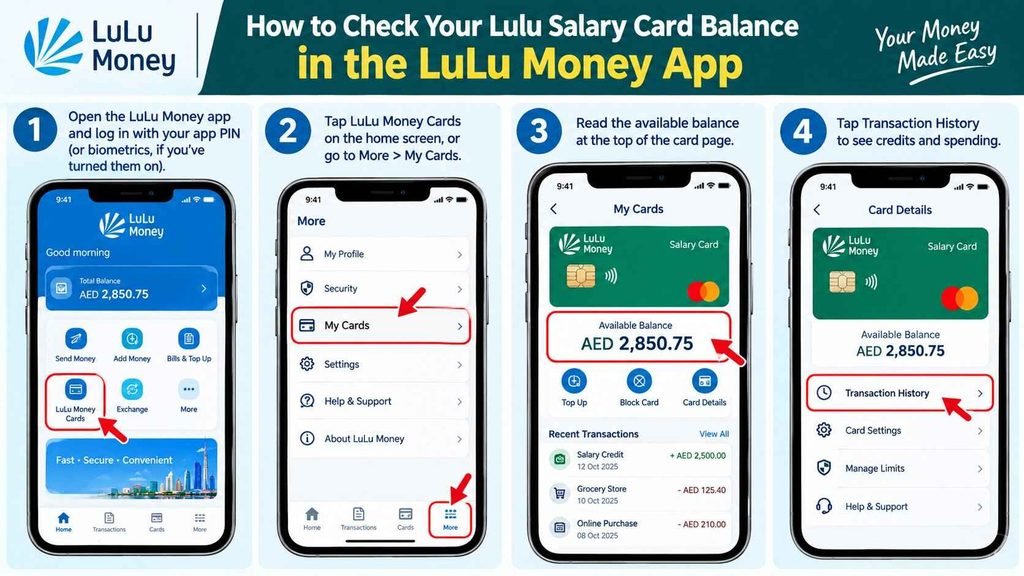
In the LuLu Money app, tap LuLu Money Cards on the home screen, or go to More and then My Cards. The card page shows your virtual card with the available balance at the top. From the same page you can open Transaction History to see salary credits and spending.
Steps:
- Open the LuLu Money app and log in with your app PIN (or biometrics, if you’ve turned them on).
- Tap LuLu Money Cards on the home screen, or More > My Cards.
- Read the available balance at the top of the card page.
- Tap Transaction History to see credits and spending.
What else the app does:
- Filter history by day, week, month or custom dates, and by POS, ATM or credit transactions
- Download a PDF statement (the last month is free, and longer periods are charged)
- Lock and unlock the card, set daily, weekly or monthly limits, and change your card PIN
- Block and replace a lost card (a replacement charge is deducted)
- Raise a dispute on a transaction you don’t recognise
How do I set up the LuLu Money app for the first time?
You register with your email, mobile number and Emirates ID, and verify with an OTP. The app is for UAE residents aged 21 and over. Lulu then needs identity verification: either visit a Lulu Exchange branch with your original Emirates ID, or complete eKYC through UAE Pass. A customer number is emailed to you once you register.
Then activate your card. If the card is new, go to the My Card page and tap Activate Card. Lulu offers three ways: OTP verification, an automated IVR call from inside the app, or a call to customer support. If the call doesn’t complete, the home page shows “activation pending”.
What if I forget my app PIN?
On the login page tap Forgot PIN, enter your registered mobile number, type the OTP sent to it, then set a new 4-digit PIN. To change a PIN you remember, go to More and then Change PIN.
What if I forget my card PIN?
Open the My Card page and choose Change/Set Card PIN. Enter the requested card details, confirm the OTP sent to your registered mobile number, then set the new PIN. The card PIN (for ATMs and payments) is separate from your app PIN (for logging in).
Can I check my Lulu salary card balance by SMS?
Many guides say to send BAL and your card number to 51199 from your registered mobile number. Lulu’s own card FAQ doesn’t list an SMS balance service. Confirm with customer care on 600 522 204 before using any SMS method, and never text your full card number to a number you haven’t verified.
Why the caution: Sending a 16-digit card number to a short code is exactly what a scammer would ask for. If Lulu confirms an SMS service for your card, use only the number they give you, and send from your registered mobile.
Salary-credit alerts are a different thing. Lulu’s branch pages promote unlimited debit and credit alerts for WPS salary card holders, so you may get an SMS when your salary lands. That only works if the mobile number on your card record is current. If you’ve changed numbers, update it at a branch.
How do I do a Lulu ATM balance check?
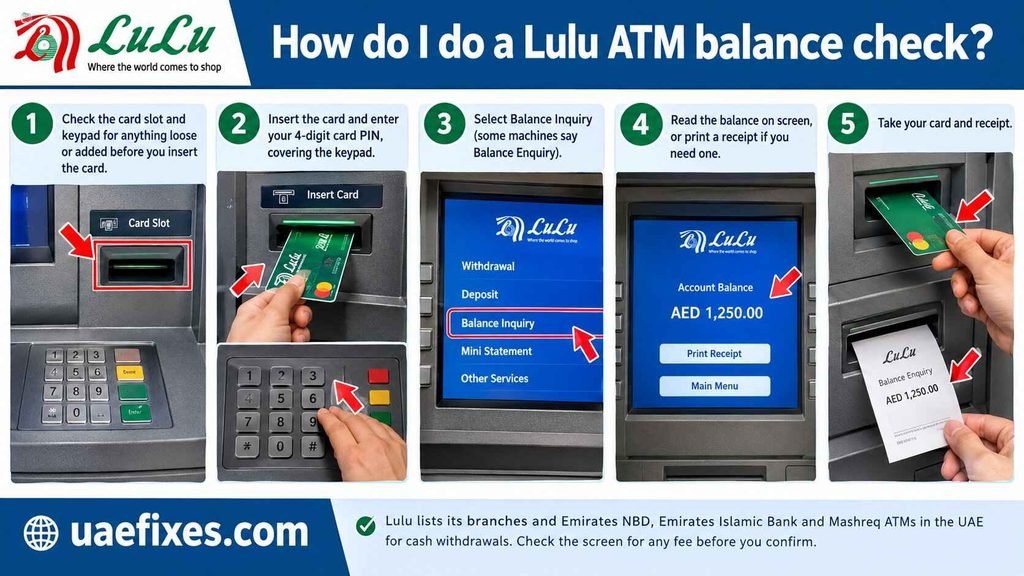
Insert your Lulu card into a supported ATM, enter your card PIN, choose Balance Inquiry, and read or print the balance. Lulu lists its branches and Emirates NBD, Emirates Islamic Bank and Mashreq ATMs in the UAE for cash withdrawals. Check the screen for any fee before you confirm.
Steps:
- Check the card slot and keypad for anything loose or added before you insert the card.
- Insert the card and enter your 4-digit card PIN, covering the keypad.
- Select Balance Inquiry (some machines say Balance Enquiry).
- Read the balance on screen, or print a receipt if you need one.
- Take your card and receipt.
What does it cost? Lulu doesn’t publish a balance-inquiry fee on the pages I reviewed. One guide quotes AED 1 to AED 2 at other UAE banks’ ATMs, which Lulu doesn’t confirm. If a fee notice appears on screen, you can usually cancel. For exact charges, ask customer care.
Why did the ATM decline my card?
- The card isn’t activated yet, or it’s locked in the app
- You’ve entered the wrong card PIN, and repeated wrong tries can block the card
- You’ve hit a daily withdrawal or spending limit
- The ATM doesn’t support your card, so try a Lulu branch, Emirates NBD, Emirates Islamic or Mashreq ATM
- The balance is lower than the amount you asked for
What is the Lulu salary check number?
The official Lulu Exchange customer care number is 600 522 204, or +971 600 522 204 from abroad. You can also email customercare@ae.luluexchange.com. Lulu says complaints are acknowledged within 2 business days and resolved within 15 business days.
| Contact | Details |
|---|---|
| Customer care (UAE) | 600 522 204 |
| From outside the UAE | +971 600 522 204 |
| customercare@ae.luluexchange.com | |
| Complaint response | Acknowledged within 2 business days, resolved within 15 business days |
A number that doesn’t match: Some guides list 600 526 526. It doesn’t appear on Lulu’s official pages, so use 600 522 204.
Can I check my Lulu salary card balance online without the app?
Lulu’s card FAQ describes checking your balance in the app, so that’s the confirmed online route. Guides disagree about whether lulumoney.com shows a card balance, and some describe a website login with a card number. Don’t enter card details on any site you can’t verify. Without a smartphone, use an ATM, a branch or the phone.
Can I check my balance at a Lulu Exchange branch?
Yes. Lulu says its support teams serve WPS customers in all branches. Bring your original Emirates ID and your card, and ask for a balance inquiry. A branch is also the right place to fix a changed mobile number, a forgotten PIN you can’t reset, or an Emirates ID that has expired and needs KYC updated.
استعلام عن راتبي: How do I know my salary arrived?
كيف أعرف أن راتبي وصل؟ Check your card balance and transaction history in the LuLu Money app for a salary credit. That shows whether the money reached your card. If nothing arrived, the next thing to check is whether your employer sent the salary through the Wage Protection System (WPS), starting with HR or payroll.
Two separate questions:
- Did money reach my card? Check the app’s transaction history or an ATM balance inquiry.
- Did my employer pay on time? Ask HR for the payment date and WPS confirmation. Lulu can only credit what your employer sends.
UAE salary rules in brief: If your contract doesn’t state a pay period, wages must be paid at least once a month. An employer is generally treated as late if salary isn’t paid within 15 days after the due date, unless your contract sets a shorter period. These rules can change, so check MOHRE’s official channels.
What if my Lulu salary hasn’t arrived?
Start with your own records, then your employer, then Lulu, then MOHRE. Don’t pay anyone to “release” your salary.
- Check the app’s transaction history for the last few days, including filters for credits.
- Ask HR or payroll when the salary file was sent and whether it went through WPS.
- Call Lulu customer care on 600 522 204 and ask whether any salary has been received for your card.
- File a complaint with MOHRE if your employer hasn’t paid. The MOHRE app (sign in with MOHRE or UAE Pass) has a confidential “My salary” service that doesn’t disclose your identity to the employer. MOHRE’s toll-free number is 600590000.
Why is my Lulu salary card balance lower than expected?
Check your transaction history first. The usual causes are spending you forgot, an advance taken through the app, or a remittance paid from the card. Lulu’s app lets you pay money transfers using your salary card, and the history will show each one.
| Possible cause | How to check |
|---|---|
| Card purchases or ATM withdrawals | Transaction History, filter by POS or ATM |
| Remittance paid from the card | Transaction History in the app |
| Earned Wage Access advance | Lulu’s Key Facts Statement says advances and fees are deducted when your next salary arrives |
| Fees (such as a replacement card) | Transaction History |
| Salary was lower than expected | Compare with your contract and payslip |
| Unrecognised charge | Open it and tap Raise Dispute |
About salary advances: If your employer participates and you used Earned Wage Access in the app, the advance and its fees are settled from your next salary. Lulu’s Key Facts Statement describes up to 50% of monthly salary, capped at AED 5,000, with a 5% fee plus VAT. That’s why a salary can arrive looking smaller.
Common Lulu salary card problems and fixes
| Problem | What to do |
|---|---|
| App won’t let me register | You need email, mobile number, Emirates ID and OTP. KYC is done at a branch or through UAE Pass |
| Card not activated | In the app: My Card > Activate Card (OTP, IVR or customer support) |
| Card locked | In the app, open My Card > Activate Card and tap Unlock, then confirm the OTP |
| Forgot app PIN | Login page > Forgot PIN > OTP > new PIN |
| Forgot card PIN | My Card > Change/Set Card PIN > OTP > new PIN |
| Lost or stolen card | Block it in the app (My Card > Block & Replace Card) and call 600 522 204. A replacement charge is deducted |
| OTP not arriving | Check your registered mobile number is current. Update it at a branch |
| ATM declines the card | Check activation, lock status, limits and PIN |
| Unrecognised transaction | Raise Dispute in Transaction History, then call customer care |
Can I check my Lulu salary card balance from abroad?
Yes, with internet access in the LuLu Money app. The +971 600 522 204 number is listed for calls from outside the UAE. If you use the card abroad, Lulu’s Key Facts Statement says conversion rates and usage fees apply under the card issuer’s and local bank’s terms.
Who should NOT rely on one method?
- Anyone without a current registered mobile number. OTPs and alerts won’t reach you, so fix it at a branch first.
- Anyone who got an SMS or WhatsApp link about a “blocked” card. Close it and use the official app.
- Anyone tempted to text a full card number to an unverified short code.
- Anyone checking salary status only on the card. If the card shows nothing, the problem may be with your employer’s WPS payment.
- Anyone using a shared or borrowed phone for the app. Use an ATM or branch instead.
Lulu salary card balance check myths vs facts
| Myth | Fact |
|---|---|
| “SMS to 51199 is official” | Widely quoted, but not listed in Lulu’s card FAQ. Confirm with customer care |
| “The customer care number is 600 526 526” | Lulu’s official pages list 600 522 204 |
| “Lulu can credit my salary if my employer is late” | Lulu credits what your employer sends through WPS |
| “My app PIN and card PIN are the same” | They’re separate. One logs you in, the other works at ATMs and payments |
| “A smaller salary means Lulu took money” | Check history for purchases, remittances and any Earned Wage Access advance |
| “Any site with Lulu in the name is official” | Official sites are luluexchange.com and lulumoney.com |
People Also Ask
How do I check my Lulu salary card balance?
Open the LuLu Money app, go to My Cards, and read the available balance on the card page. You can also use a supported ATM or call 600 522 204.
What is the Lulu salary card balance check number?
The official Lulu Exchange customer care number is 600 522 204 (+971 600 522 204 from abroad). Some guides list 600 526 526, which doesn’t appear on Lulu’s official pages.
Can I check my Lulu balance by SMS?
Many guides say to send BAL and your card number to 51199, but Lulu’s card FAQ doesn’t list an SMS balance service. Confirm with customer care first and don’t text your full card number to an unverified number.
How do I check my Lulu balance at an ATM?
Insert your card, enter your card PIN, and choose Balance Inquiry. Lulu lists its branches and Emirates NBD, Emirates Islamic and Mashreq ATMs in the UAE for cash withdrawals.
Is there a Lulu salary card app?
Yes. The LuLu Money app (App Store and Google Play) shows your balance, transactions and statements, and lets you lock the card, set limits and change your PIN.
How do I activate my Lulu salary card?
In the app, open My Card and tap Activate Card. You can activate with an OTP, an in-app IVR call, or customer support.
What if I forgot my Lulu card PIN?
In the app, open My Card, choose Change/Set Card PIN, confirm the OTP and set a new PIN. If you can’t use the app, visit a Lulu Exchange branch.
Why is my Lulu salary card balance zero?
Check transaction history for spending, remittances or an advance. If no salary credit appears, ask HR whether payment was sent through WPS, then call Lulu customer care.
Can I check my Lulu salary card balance without the app?
Yes, with a supported ATM, a Lulu Exchange branch visit, or a call to customer care. SMS is widely quoted but unconfirmed by Lulu.
Can I check my Lulu balance from abroad?
Yes, through the app with internet access. You can also call +971 600 522 204.
What does استعلام عن راتبي mean?
It means “inquiry about my salary.” For a Lulu card, check the app for a salary credit. If none appears, ask your employer about their WPS payment.
What can I do if my employer hasn’t paid my salary?
Ask HR first, then file a complaint with MOHRE through its app or on 600590000. MOHRE’s “My salary” service is confidential.