How to Fix Washing Machine Not Draining: Easy Checks That Work
A washing machine that fills with water but refuses to drain can quickly turn a normal laundry day into a frustrating mess. You may be left with soaking-wet clothes, standing water in the drum, and a machine that refuses to move to the spin cycle.
The good news is that a washing machine not draining does not always mean the pump is broken. A clogged filter, blocked drain hose, trapped coin, or incorrect hose position can often be responsible.
Safety Note
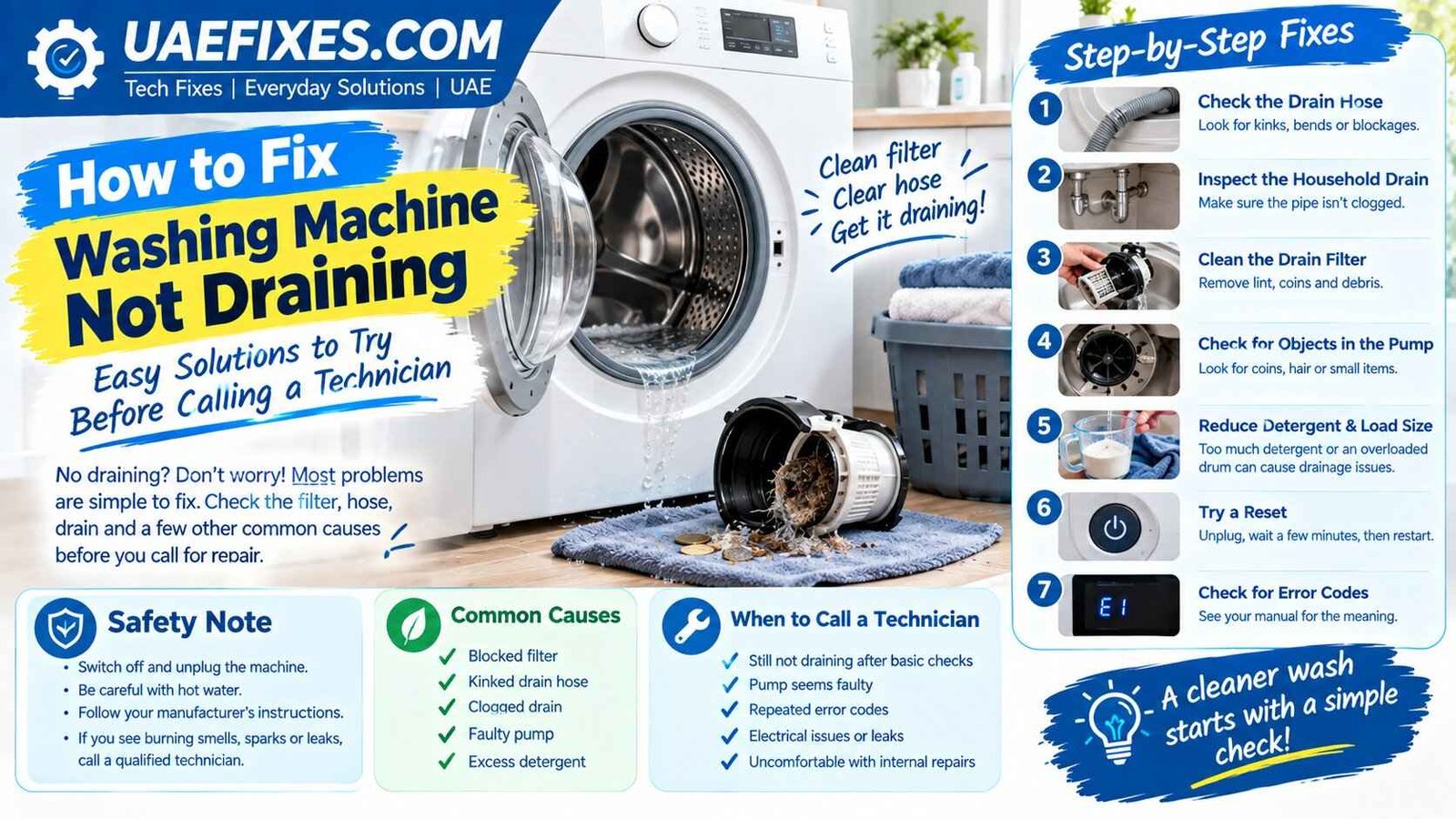
Before checking the drain filter, hose, or pump area, switch off the washing machine and unplug it from the electrical outlet. Be careful when draining trapped water because it may still be hot, and keep towels or a shallow container nearby to prevent water from reaching electrical connections.
Manufacturer guidance from Samsung and LG recommends disconnecting the machine before cleaning the pump filter and taking care when releasing residual water. If you notice burning smells, damaged wiring, electrical sparks, leaks around electrical components, or a suspected pump/electrical fault, stop troubleshooting and contact a qualified appliance technician.
For more practical household fixes, UAEFIXES.COM focuses on simple solutions while putting safety first.
Why Is My Washing Machine Not Draining?
The most common causes include:
- A clogged drain pump filter
- A kinked or crushed drain hose
- A blocked household drain
- Coins, hair, lint, or small objects stuck in the pump
- Too much detergent or residue buildup
- Incorrect drain hose installation
- A blocked or faulty drain pump
- An unbalanced or overloaded load
- An electronic error that needs a reset
The exact design varies between washing-machine brands and models, so always check your owner’s manual before removing a component.
1. Check the Drain Hose First
Start with the easiest check.
Look behind the washing machine and inspect the drain hose. Make sure it isn’t:
- Bent sharply
- Kinked
- Crushed against the wall
- Blocked
- Pulled out of its proper position
A restricted hose can prevent water from leaving the machine properly.
If the washing machine was recently moved, pay particular attention to the hose. Moving the appliance can accidentally pinch or reposition it.
2. Check Whether the Household Drain Is Blocked
Sometimes the washing machine isn’t the problem.
The drain hose may be working correctly, but the water cannot enter the household drain because the pipe is blocked.
If water backs up when the washing machine attempts to drain, inspect the drain connection and surrounding plumbing.
If the household drain is clogged, clearing the washing machine filter won’t completely solve the problem.
3. Clean the Washing Machine Drain Filter
A blocked drain filter is one of the most common reasons a front-loading washing machine won’t drain.
The filter can collect:
- Coins
- Hair
- Lint
- Small pieces of fabric
- Buttons
- Tissue
- Hairpins
- Detergent residue
- Other small objects left in pockets
How to Clean the Drain Filter
- Turn the washing machine off.
- Unplug it.
- Locate the drain-filter access panel, usually near the bottom front of a front-loading machine.
- Put towels and a shallow container underneath.
- If your model has an emergency drain hose, use it to release trapped water.
- Slowly open the filter because water may come out.
- Remove visible debris.
- Rinse and clean the filter.
- Check the filter housing for additional objects.
- Reinstall the filter securely.
- Close the access panel.
- Plug the machine back in and test a drain or spin cycle.
Important: Not every washing machine has a user-accessible pump filter. Some top-load models use a different drainage system.
4. Check for Coins or Objects Inside the Pump Area
If you have cleaned the filter but the washing machine still won’t drain, something may be stuck farther inside the pump area.
Coins are a particularly common culprit because they can move through the drum drainage system and become trapped near the pump.
Don’t force anything deeper into the machine.
If you cannot safely access the obstruction according to the manufacturer’s instructions, it’s better to have the pump inspected by a technician.
5. Listen to the Washing Machine
Your washing machine’s sound can provide a useful clue.
You hear a humming sound
The drain pump may be trying to operate but struggling because of an obstruction or pump problem.
You hear nothing
There could be an electrical, control, or pump issue—or the machine may not be reaching the drain stage because of another error.
You hear the pump running but water barely moves
Check the filter, drain hose, and household drain for blockages.
These sounds aren’t a definite diagnosis, but they can help narrow down the problem.
6. Check the Drain Hose Installation
A drain hose that is installed incorrectly can cause drainage problems.
Check your washing machine’s manual for the manufacturer’s required hose position and height. Different machines have different installation requirements, so don’t assume every washer uses the same measurements.
Also make sure the hose isn’t pushed too deeply into the drain or sealed in a way that prevents proper drainage.
7. Reduce Excess Detergent
Using too much detergent can create excessive residue and buildup.
Modern washing machines often need much less detergent than people expect, particularly when using concentrated detergent.
Check the detergent packaging and your washing machine manual for the recommended amount.
If you’ve been using excessive detergent for a long time, running the manufacturer’s recommended cleaning cycle may help remove residue.
8. Check Whether the Machine Is Overloaded
An overloaded washing machine may struggle with certain parts of the wash and spin process.
If the drum is packed tightly with heavy towels, blankets, or other bulky items, remove some of the load and try a drain or spin cycle again.
For large items, follow the machine manufacturer’s load recommendations rather than filling the drum as much as possible.
9. Try a Simple Reset
Sometimes a temporary electronic error can stop the machine from completing a cycle.
Try this:
- Turn the machine off.
- Unplug it.
- Wait several minutes.
- Plug it back in.
- Select a drain or spin program.
- Check whether the water leaves the drum.
A reset won’t repair a blocked filter or broken pump, but it can help rule out a temporary control issue.
10. Check the Washing Machine Error Code
If your washing machine displays an error code, write it down before resetting the appliance.
Search the code in the owner’s manual or the manufacturer’s official support website.
Different brands use different codes. For example, an error associated with drainage on one brand may have a completely different code on another.
Don’t ignore a recurring error simply because the machine works after a reset.
11. What If the Washing Machine Still Has Water Inside?
If there is still a large amount of water in the drum, don’t immediately open the door on a front-loading machine.
The door may be locked because water remains inside.
First follow the manufacturer’s instructions for emergency draining. Depending on the model, this may involve an emergency drain tube or drain-filter area.
Keep towels and a container ready because a surprising amount of water can come out.
12. Washing Machine Not Draining But Spinning
If the machine appears to spin but water remains inside, the problem may still be related to the drainage system.
Check:
- Drain hose
- Pump filter
- Household drain
- Pump area
- Error codes
- Hose installation
The machine may be able to rotate the drum even though it cannot move water out efficiently.
13. Washing Machine Drains Slowly
Slow drainage is often an early warning sign.
Don’t wait until the machine completely stops draining.
A slow drain can indicate:
- Partially blocked filter
- Restricted drain hose
- Partially blocked plumbing
- Debris around the pump
- Excessive detergent residue
Cleaning the filter and checking the hose early may prevent the problem from becoming worse.
14. When the Drain Pump May Be Faulty
If the hose and filter are clear but the washing machine still won’t drain, the drain pump may need inspection.
Possible signs include:
- Pump makes unusual noises
- Pump runs but doesn’t move water
- Pump doesn’t run at all
- Machine repeatedly displays a drain error
- Water remains after multiple drain attempts
- The problem returns immediately after cleaning the filter
Replacing a drain pump involves accessing electrical and mechanical components, so this is generally better left to a qualified technician unless your manufacturer’s instructions specifically provide a safe user-service procedure.
15. Don’t Forget the Small Things in Pockets
Coins, tissues, receipts, hairpins, screws, and small plastic objects can eventually find their way into the drainage system.
Before washing clothes, empty pockets.
This simple habit can help reduce blockages and protect the pump and filter.
Quick Washing Machine Drain Checklist
Before calling for repair, check these in order:
- Turn off and unplug the washing machine.
- Check the drain hose.
- Look for kinks or crushing.
- Check the household drain.
- Clean the pump filter if your model has one.
- Remove visible debris.
- Check for an error code.
- Reduce an overloaded load.
- Try a drain or spin cycle.
- Reset the machine.
- If it still won’t drain, arrange professional service.
Washing Machine Not Draining: Common Causes
| Problem | What to Check |
|---|---|
| No draining at all | Filter, hose, pump |
| Slow draining | Filter, hose, household drain |
| Humming noise | Possible pump obstruction |
| No pump sound | Possible pump/electrical issue |
| Water comes back into the machine | Drain installation or plumbing |
| Drain error appears | Manufacturer error-code guide |
| Problem started after moving washer | Drain hose position |
| Problem keeps returning | Pump, plumbing, or recurring blockage |
When Should You Call a Washing Machine Technician?
Call a qualified technician if:
- The machine still won’t drain after basic checks.
- The pump appears to be faulty.
- You smell burning.
- You see damaged wiring.
- Water is leaking near electrical components.
- The machine repeatedly shows the same drainage error.
- You need to remove or replace an internal pump.
- You are uncomfortable working around electrical appliances.
Trying to save money by opening electrical components without the right experience can turn a simple drainage problem into a much more expensive repair.
Final Thoughts
When your washing machine is not draining, don’t assume the pump has failed immediately.
Start with the simple possibilities: check the drain hose, inspect the household drain, clean the accessible pump filter, remove obvious debris, and check the machine’s error code.
If those checks don’t solve the problem, the drain pump or another internal component may need professional attention.
A few minutes of basic troubleshooting can sometimes save you an unnecessary service call—but electrical or internal repairs are best handled safely.