Where to Sell Used Electronics in UAE: Best Options for a Safe Sale
That old phone sitting in your drawer might still be worth a few hundred dirhams. The laptop you replaced last year may still have a buyer. Even an unused monitor, camera, gaming console, tablet, or smart watch can be worth something instead of collecting dust.
The difficult part isn’t deciding to sell it. The real question is: where should you sell used electronics in the UAE without getting a terrible price, wasting days talking to buyers, or putting your personal data at risk?
In the UAE, you have several choices. You can list the device yourself on a classifieds marketplace, sell directly to a specialist buyer, visit a physical electronics shop, or choose a trade-in service. The best option depends on whether your priority is the highest possible price, quick cash, convenience, or safety.
Safety Note
Before selling any phone, tablet, laptop, or other device, back up your important information and remove your personal accounts and data. Apple recommends backing up and erasing personal information before selling an iPhone or iPad, while Google recommends clearing your data and resetting Android devices before selling, trading in, or recycling them.
For more practical technology and everyday selling guides, UAEFIXES.COM can help you prepare your device before you hand it to its next owner.
Where Can You Sell Used Electronics in the UAE?
There isn’t one perfect place for everyone.
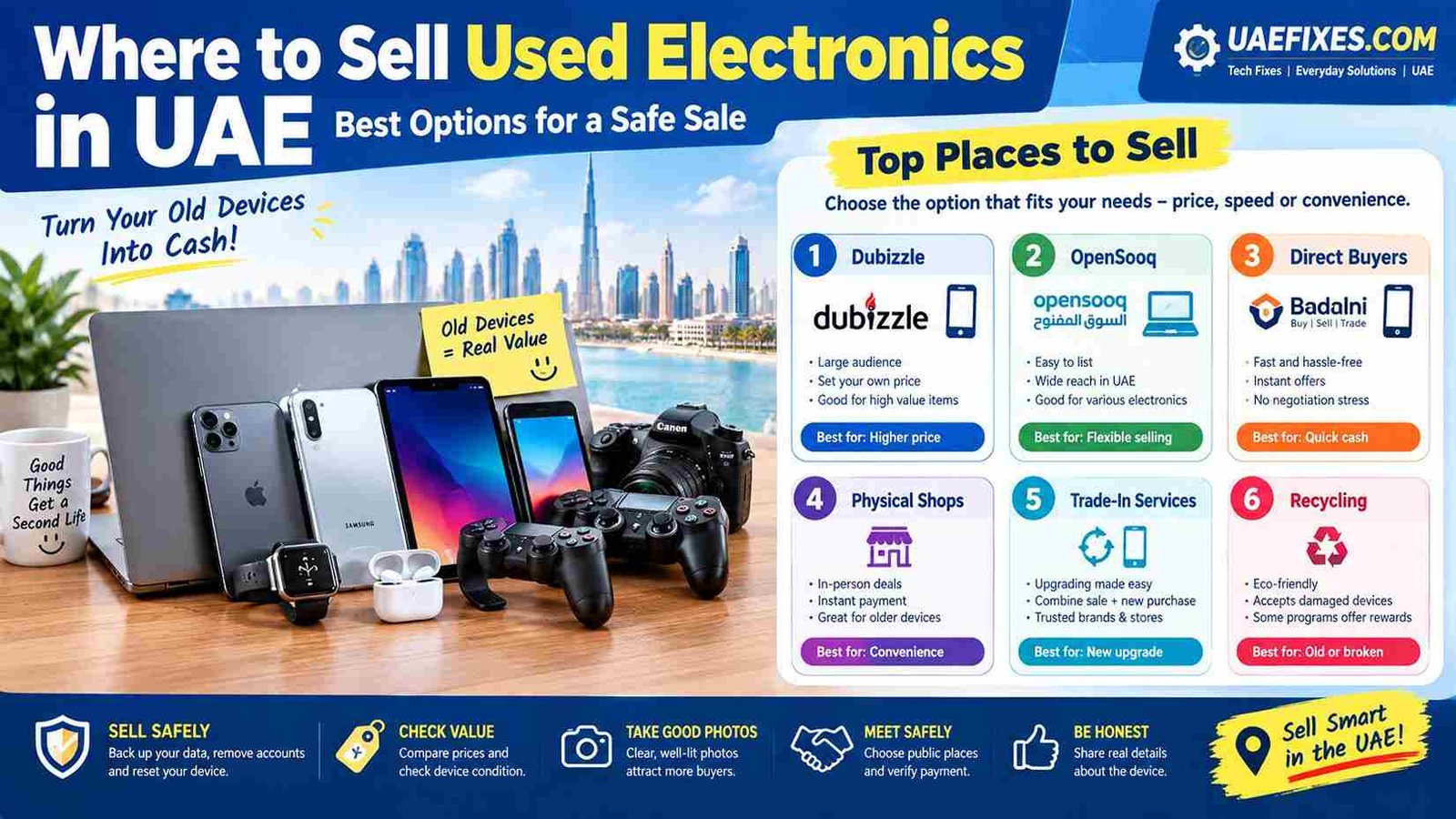
Your main options are:
- Classified marketplaces — potentially better price, but more work.
- Direct electronics buyers — faster and easier, usually with less negotiation.
- Physical shops — convenient if you want an in-person quote.
- Trade-in services — useful when upgrading to another device.
- Specialist buyers — particularly useful for phones, laptops and higher-value electronics.
The right choice depends on what you are selling and how quickly you want your money.
1. Sell Used Electronics on Dubizzle
Dubizzle UAE is one of the most obvious places to start when selling used electronics in the UAE.
Its UAE electronics section includes phones, tablets, televisions, audio equipment, wearables, gadgets, cameras, projectors and other categories.
The biggest advantage is simple: you set the price and deal directly with potential buyers.
This can make sense if you have a desirable device in good condition and you’re willing to wait for the right buyer.
Best for:
- iPhones and Samsung phones
- Laptops
- Gaming PCs
- Monitors
- TVs
- Cameras
- Gaming consoles
- Tablets
- Speakers and audio equipment
The downside
You may receive plenty of messages that go nowhere.
Some buyers will negotiate aggressively. Others may ask questions without actually intending to buy. That’s part of private selling.
If you have the patience, however, a private sale can potentially give you more money than accepting the first quick-cash offer.
2. Try OpenSooq
OpenSooq UAE is another classifieds option for selling electronics.
Its UAE electronics categories include phones and tablets, computers and laptops, household appliances, gaming products and other electronics.
OpenSooq allows sellers to create listings with photos and product information and communicate with interested buyers.
This makes it useful if you want another marketplace beyond Dubizzle.
Best for:
- Phones
- Tablets
- Laptops
- Cameras
- TVs
- Computer equipment
- Gaming equipment
- Accessories
The important thing is not to post everywhere blindly. Start with a clear listing, compare the responses and see where genuine buyers appear.
3. Sell Directly to a Used-Device Buyer
If you don’t want to spend your evening answering messages like “last price?”, a direct buyer can be much easier.
Companies such as Badalni advertise direct buying of phones, tablets, laptops and other electronics across the UAE, with pickup and payment options.
Another example is SellItBuyIt, which lists categories including smartphones, laptops, tablets and smartwatches and operates locations in Dubai and Sharjah.
These services can be attractive when your priority is speed and convenience rather than squeezing every last dirham from the sale.
4. Visit a Physical Electronics Shop
Sometimes you simply want the transaction finished.
You take the device to a shop, someone checks it, gives you an offer and you decide whether to accept it.
This can be particularly convenient for:
- Older phones
- Damaged phones
- Laptops
- Tablets
- TVs
- Accessories
- Devices you don’t want to ship
The trade-off is that a shop needs room to make money when it resells or refurbishes the device. Therefore, its offer may not be as high as what you could potentially get from a direct private buyer.
Think of it this way:
Private sale = potentially more money, more effort.
Shop/direct buyer = potentially less money, less hassle.
5. Consider a Trade-In
If you’re selling an old device because you’re buying a new one, check whether the retailer or manufacturer offers a trade-in program.
This can make the process much easier because you’re effectively combining two jobs:
sell old device + upgrade to new device.
Before accepting a trade-in value, however, compare it with the current second-hand market.
You may discover that selling privately gives you more money.
Which Option Gives You the Most Money?
Usually, the biggest factor is how much effort you’re willing to put into the sale.
A private marketplace listing gives you the opportunity to negotiate directly with buyers. A direct buyer or shop gives you convenience but needs to account for its own costs and resale margin.
So don’t automatically choose the first offer.
For example, if someone offers you AED 700 for a phone and you see comparable devices selling for around AED 1,000, it may be worth spending some extra time creating your own listing.
But if your device is old, damaged or difficult to sell, taking a reasonable quick offer may be the better decision.
How to Check Your Used Electronics Value
Before you choose where to sell, spend a few minutes researching the current market.
Search for your exact:
- Brand
- Model
- Storage capacity
- RAM
- Processor
- Screen size
- Condition
- Battery health
- Accessories
- Warranty status
Don’t compare your excellent-condition iPhone with a damaged one.
And don’t compare a laptop with 16GB RAM and an SSD with a lower-spec version simply because both have the same brand name.
Exact specifications matter.
Check the Condition Honestly
One of the fastest ways to lose a buyer’s trust is to hide damage.
If the screen has scratches, say so.
If the battery is weak, mention it.
If a laptop has a damaged hinge, photograph it.
If the device has been repaired, disclose that information where relevant.
A buyer who knows exactly what they are getting is much more likely to complete the transaction.
Honesty can actually make selling easier.
Clean the Device Before Taking Photos
This sounds almost too simple, but it works.
A dusty laptop covered in fingerprints looks older than it really is.
Clean the outside carefully, remove stickers if appropriate, wipe the screen with a suitable microfiber cloth and photograph the device in good lighting.
For phones, show:
- Front
- Back
- Sides
- Camera
- Screen while powered on
- Battery health where available
- Accessories
- Original box, if available
Good photographs can make the difference between someone scrolling past your listing and someone sending you a message.
Write a Better Listing
Instead of writing:
“iPhone for sale. Good condition. Interested call.”
Give the buyer useful information.
Include the exact model, storage, condition, battery health where available, purchase history if relevant, included accessories and asking price.
For example:
iPhone 15 Pro 256GB – Excellent Condition – Battery Health 91% – Original Cable – AED XXXX
The buyer immediately knows what they are looking at.
Don’t Hide the Asking Price
Some sellers prefer to write “DM for price.”
That can create unnecessary messages and discourage serious buyers.
A clear asking price helps people decide quickly.
You can also write:
AED 1,500 – reasonable negotiation for serious buyers
This leaves room for discussion without turning your listing into an endless bargaining session.
Protect Your Personal Data Before Selling
This is probably the most important part of selling used electronics.
Your phone or laptop may contain:
- Photos
- WhatsApp conversations
- Emails
- Saved passwords
- Banking information
- Documents
- Contacts
- Personal accounts
- Browser data
Don’t hand over the device while your accounts are still logged in.
For iPhone and iPad
Apple recommends backing up your device, signing out of your Apple Account and using Erase All Content and Settings before selling or giving the device to someone else.
Also remember to remove your SIM card when appropriate and deal with eSIM/service transfer correctly.
For Android
Google recommends backing up your information and resetting the device to factory settings before selling, trading in or recycling it.
The exact menu can vary by manufacturer, so check the manufacturer’s instructions if necessary.
For Windows laptops
Back up your important files first and remove personal accounts before resetting the computer.
Don’t assume that deleting a few folders is enough.
Meet Buyers Safely
If you’re selling privately, think about where the meeting will happen.
For an expensive phone, laptop or camera, avoid inviting an unknown buyer directly into your home.
A public location with people around is generally a better choice.
For higher-value electronics, consider meeting somewhere appropriate where you feel comfortable and can safely test the payment.
And never hand over the device because someone shows you a payment screenshot.
Check that the money has actually arrived in your account.
Be Careful With “Payment Sent” Screenshots
One of the simplest rules of private selling is:
A screenshot is not proof of payment.
Open your own banking application or otherwise independently verify that the payment has been received before handing over an expensive device.
Don’t allow pressure to rush you.
If someone says, “I’m in a hurry, just give me the phone; the transfer is coming,” you can simply say no.
Your device can wait.
What If the Electronics Are Broken?
Don’t automatically throw a broken device away.
A phone with a cracked screen, laptop with a damaged keyboard, faulty monitor or old gaming console may still have value for repair, refurbishment or parts.
However, clearly describe the fault.
Instead of saying:
“Phone works perfectly.”
say:
“Phone powers on but screen is cracked and touch sometimes fails.”
The right buyer can decide whether it is worth repairing.
Should You Sell or Recycle Old Electronics?
If the device has very little resale value, recycling may make more sense than spending weeks trying to sell it.
This is particularly true for very old chargers, damaged accessories, obsolete devices and electronics that are no longer practical to use.
If you’re unsure, check whether the manufacturer, retailer or an appropriate recycling program accepts the device.
And always remove your personal information first.
Best Place to Sell Used Electronics: Quick Comparison
| Option | Best For | Speed | Potential Price | Effort |
|---|---|---|---|---|
| Dubizzle | Private sales | Medium | High | Medium |
| OpenSooq | Private listings | Medium | High | Medium |
| Direct buyer | Quick cash | Fast | Medium | Low |
| Physical shop | Convenience | Fast | Medium/Low | Low |
| Trade-in | Upgrading | Fast | Medium | Low |
| Recycling | Very old/broken devices | Fast | Low/None | Low |
These are general trade-offs rather than guaranteed prices. The actual offer depends on the device, condition, demand and current market.
What Is the Best Option for You?
If you’re thinking:
“I want the highest price.”
Start with a private listing and be prepared to negotiate.
If you’re thinking:
“I just want this gone today.”
A direct buyer or physical shop may be more convenient.
If you’re thinking:
“I’m buying a new phone anyway.”
Compare trade-in options.
And if you’re thinking:
“This thing is so old that nobody will buy it.”
Check anyway. You may be surprised.
Common Mistakes When Selling Used Electronics
Selling too quickly
Don’t accept the first offer simply because someone responded within five minutes.
Asking an unrealistic price
Look at comparable listings before deciding your price.
Hiding defects
A buyer who discovers a problem after meeting you may simply walk away.
Forgetting your accounts
This is one of the biggest mistakes you can make.
Giving the device away before payment clears
Always verify the money yourself.
Sharing too much personal information
Your listing doesn’t need your home address, Emirates ID details, banking information or unnecessary personal information.
Frequently Asked Questions
Where can I sell used electronics in the UAE?
You can sell used electronics through classified marketplaces such as Dubizzle and OpenSooq, direct electronics buyers, physical shops and trade-in services.
Where can I sell used electronics in Dubai?
Dubai has several options, including Dubizzle and OpenSooq, as well as direct buyers and physical electronics shops. Dubizzle currently has a large active electronics marketplace in Dubai.
Where can I sell an old phone for cash in the UAE?
You can list it privately, approach a direct phone buyer or visit a physical shop. Compare several offers before accepting one.
Is it better to sell privately or to a shop?
Private selling can give you more control over the price, while a shop or direct buyer is usually easier and faster. Your choice depends on whether price or convenience matters more.
Should I factory reset my phone before selling it?
Yes. Back up your information first, then remove your accounts and erase the device properly. Apple and Google both provide official instructions for preparing devices for sale or trade-in.
What used electronics sell well?
Phones, laptops, tablets, gaming consoles, cameras, monitors, TVs and popular accessories can attract buyers, particularly when they are in good condition and have clear specifications.
Can I sell broken electronics?
Yes, depending on the device. Broken electronics may still have value for repair, refurbishment or parts. Always describe the fault accurately.
Final Thoughts
Selling an old electronic device can feel strangely satisfying. That phone you stopped using six months ago, the laptop sitting in a cupboard, or the monitor taking up space in a corner doesn’t have to stay there forever.
But don’t rush just because you want to get rid of it.
Check its value. Clean it. Take honest photos. Protect your data. Compare your selling options. Verify payment.
A little preparation can mean the difference between thinking “I got rid of this old thing” and thinking “I’m glad I didn’t sell it for the first offer.”