
What Is a CPU Cache? L1, L2, L3 Cache Explained
Have you ever wondered why a computer processor can perform billions of calculations every second without constantly waiting for your RAM?
One important reason is CPU cache.
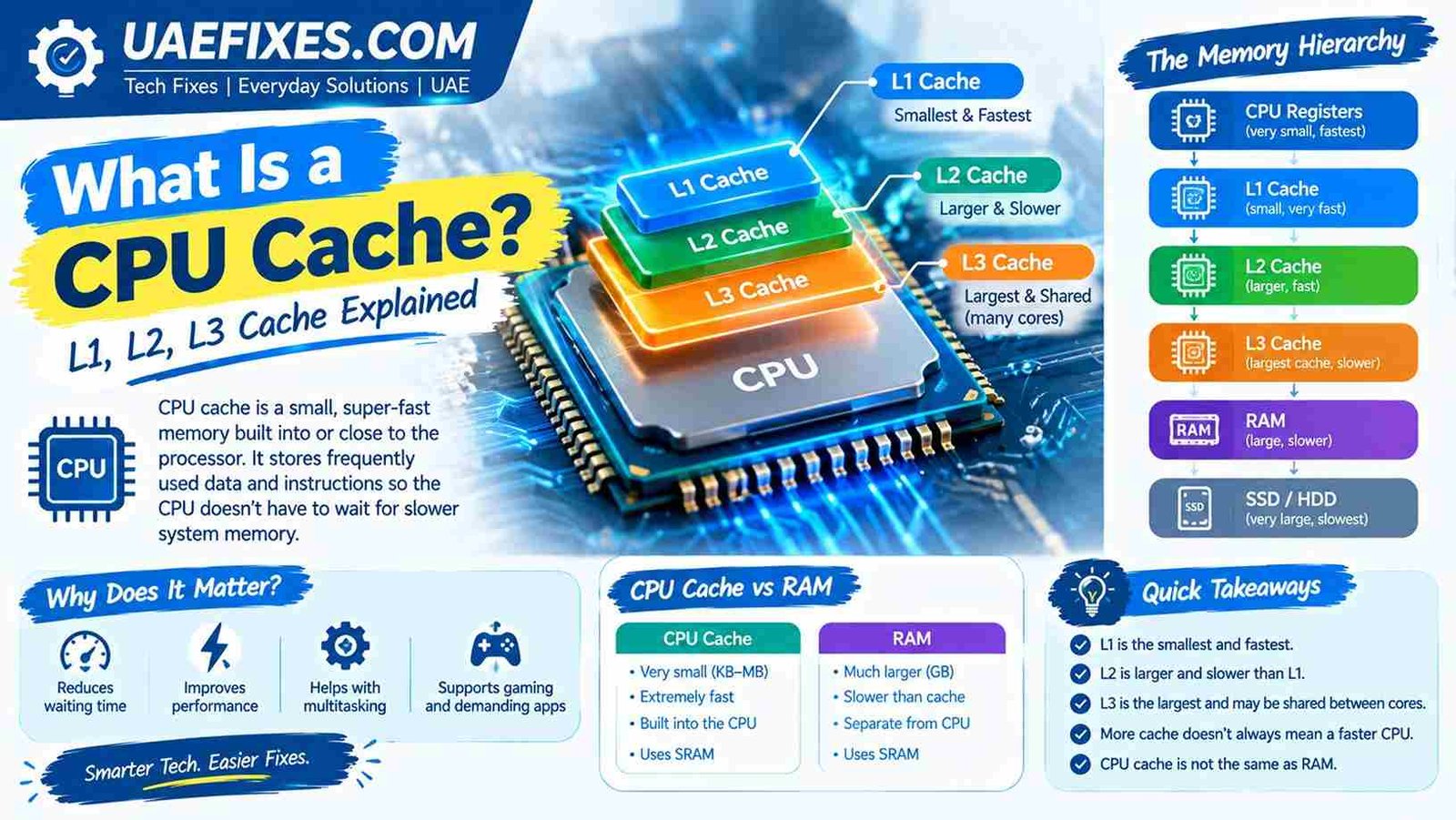
CPU cache is a small amount of extremely fast memory built into or very close to the processor. It stores data and instructions that the CPU is likely to need soon, helping the processor avoid repeatedly waiting for slower system memory.
If terms like L1 cache, L2 cache, L3 cache, cache memory, and RAM sound confusing, don’t worry. Once you understand what the CPU is doing behind the scenes, the whole idea becomes much easier.
Safety Note
CPU cache is a hardware component, so there is normally no reason to physically access or modify it when troubleshooting everyday computer problems. Avoid opening a laptop or desktop just to inspect the CPU unless you know how to work safely with computer hardware.
If you are upgrading or replacing a processor, always check motherboard compatibility and follow the manufacturer’s installation instructions. UAEFIXES.COM focuses on practical explanations and fixes, but hardware work should be approached carefully.
What Is a CPU Cache?
A CPU cache is a small, high-speed memory area that stores frequently or recently needed data and instructions for the processor.
The CPU can access cache much faster than it can access ordinary RAM.
Think of it like this:
CPU = your worker
CPU cache = a small desk drawer
RAM = a larger filing cabinet
Storage = a large warehouse
If the worker needs something constantly, it makes sense to keep it in the desk drawer instead of walking to the filing cabinet every time.
That is essentially what CPU cache does.
Why Does a CPU Need Cache?
Modern processors are extremely fast.
The problem is that other components in a computer cannot always provide information to the CPU at the same speed.
If the processor had to wait for RAM every time it needed data, valuable processing time could be wasted.
CPU cache helps reduce these waiting periods by keeping useful information close to the processor.
The basic process looks something like this:
CPU needs data → checks cache → finds it → continues working
If the required data isn’t in the cache:
CPU needs data → checks cache → doesn’t find it → requests data from RAM → uses it → may store useful data in cache
This is one reason cache can improve processor efficiency.
How Does CPU Cache Work?
When the CPU needs information, it first checks its cache.
If the required information is there, this is called a cache hit.
If the information isn’t there, it is called a cache miss.
A simplified example:
You open an application.
The processor repeatedly needs certain instructions and data while the program is running. Some of that information may be kept in cache because it is likely to be needed again.
When the CPU finds it in cache, it can access it very quickly.
When it doesn’t, the processor may need to retrieve the information from another level of memory.
What Are L1, L2 and L3 Cache?
This is where CPU cache becomes a little more interesting.
Most modern processors use multiple cache levels.
L1 Cache
L1 cache is generally the smallest and fastest cache level.
It is located very close to the CPU cores and is commonly divided into areas for instructions and data.
Because L1 is extremely fast, it is also relatively limited in size.
Think of L1 as the information sitting directly on your desk.
L2 Cache
L2 cache is generally larger than L1 but somewhat slower.
It still provides the CPU with very fast access to frequently used information.
Depending on the processor architecture, L2 cache may be dedicated to individual cores or organized differently.
Think of L2 as a nearby drawer.
L3 Cache
L3 cache is generally larger than L1 and L2 but has higher access latency.
On many modern processors, L3 is shared among multiple CPU cores.
It acts as another fast memory layer between the processor cores and system RAM.
Think of L3 as a nearby cabinet that several workers can access.
L1 vs L2 vs L3 Cache
| Cache | Typical role | Speed | Size |
|---|---|---|---|
| L1 | Very frequently needed data/instructions | Fastest | Smallest |
| L2 | Additional fast storage for CPU data | Very fast | Larger than L1 |
| L3 | Shared cache layer on many CPUs | Slower than L1/L2 | Larger |
The exact cache sizes and architecture vary significantly between processors.
CPU Cache vs RAM
CPU cache and RAM are both forms of memory, but they serve different purposes.
CPU cache is much smaller and designed for extremely fast access by the processor.
RAM is much larger and holds the programs and data your computer is actively using.
For example, a computer might have several gigabytes of RAM but only several megabytes of CPU cache.
That doesn’t mean RAM is unimportant.
The computer needs both.
A simplified hierarchy looks like this:
CPU registers → L1 cache → L2 cache → L3 cache → RAM → SSD/HDD
As you move down the list, capacity generally increases while access becomes slower.
Is More CPU Cache Always Better?
Not necessarily.
More cache can be beneficial, but processor performance depends on many other factors.
These include:
- CPU architecture
- Clock speed
- Number of cores
- Number of threads
- Instructions per clock
- Memory performance
- Software workload
- Power limits
- Cooling
- Operating system
- Application optimization
A processor with more cache is not automatically faster than every processor with less cache.
The architecture matters.
Why Is CPU Cache So Fast?
CPU cache uses very fast memory technology, typically SRAM (Static Random-Access Memory).
SRAM is faster and more expensive per bit than the DRAM commonly used for system RAM.
That is one reason manufacturers don’t simply give CPUs huge amounts of cache.
Large amounts of extremely fast memory would take up more chip area and increase manufacturing cost.
Instead, processors use a hierarchy that balances:
Speed + capacity + cost
What Happens During a Cache Miss?
A cache miss occurs when the CPU looks for required data and doesn’t find it in the cache level being checked.
The processor then has to look elsewhere.
For example:
L1 miss → check L2
If it isn’t there:
L2 miss → check L3
If it isn’t there:
L3 miss → retrieve from RAM
This can take considerably longer than finding the information in a nearby cache.
Processors use sophisticated prediction and caching techniques to reduce unnecessary misses.
What Is Cache Hit Rate?
A cache hit rate describes how often requested data is found in the cache.
For example, if a processor makes 100 memory requests and finds the required information in cache 90 times, the simplified cache hit rate would be 90%.
A higher hit rate can generally mean less time waiting for data from slower memory.
However, real processors use multiple cache levels and complex memory-management techniques, so actual performance cannot be judged from one hit-rate number alone.
Does CPU Cache Affect Gaming?
Yes, CPU cache can affect gaming performance.
Games frequently process large amounts of information involving:
- Game logic
- Physics
- AI
- Player positions
- Objects
- World data
- Draw-call preparation
- Background tasks
Having an effective cache hierarchy can help a processor handle some workloads efficiently.
However, gaming performance also depends heavily on the GPU, CPU architecture, game engine, RAM, resolution and graphics settings.
So you shouldn’t choose a gaming CPU based only on its cache size.
Does CPU Cache Affect Everyday Computer Use?
It can.
Tasks such as web browsing, office applications, programming, media processing and multitasking involve constant movement of data between different levels of memory.
A well-designed processor cache can help reduce memory-access delays.
You probably won’t notice the cache directly.
Instead, you experience the overall result through processor performance and responsiveness.
CPU Cache vs SSD Cache
Don’t confuse CPU cache with SSD cache.
They are completely different.
CPU cache helps the processor access frequently needed data quickly.
SSD cache can refer to memory used within or alongside a storage system to improve storage performance.
They operate at different parts of the computer.
Can You Increase CPU Cache?
Usually, no.
CPU cache is built into the processor’s architecture.
You can’t normally install an extra cache module the way you can add RAM or replace an SSD.
If you need a processor with more cache, you generally need to choose a different CPU.
This is why checking processor specifications before buying a computer can be useful.
How Can I Check My CPU Cache Size?
You can usually find CPU cache information through:
- Your processor manufacturer’s specifications
- Windows system-information utilities
- CPU identification tools
- BIOS/UEFI information
- Hardware-monitoring software
The manufacturer’s official specifications are usually the best place to confirm the processor’s L1, L2 and L3 cache configuration.
Does CPU Cache Make a Computer Faster?
It can contribute to better performance, but cache is only one part of the picture.
Think of CPU performance as a team rather than one specification.
A processor with an efficient cache hierarchy, strong architecture and good memory performance can handle workloads very effectively.
But simply comparing:
CPU A: 32 MB cache
CPU B: 64 MB cache
doesn’t tell you which processor will be faster overall.
Look at independent benchmarks and the specific workload as well.
Why Don’t Computers Use Only Cache Instead of RAM?
Because cache is expensive and physically limited.
A modern computer needs a large amount of relatively affordable memory.
Using only extremely fast SRAM would make computers much more expensive and would require significantly more physical space on the processor.
The memory hierarchy solves this problem.
Small amounts of very fast memory sit close to the CPU, while larger and slower memory sits farther away.
A Simple Example
Imagine you’re cooking dinner.
You keep the ingredients you use constantly beside you:
Salt → beside the stove
Less frequently used ingredients are nearby:
Spices → kitchen cabinet
Larger supplies are stored elsewhere:
Bulk food → pantry
You don’t want to walk to the pantry every time you need salt.
CPU cache works on a similar principle.
Frequently useful information is kept closer to the processor so the CPU doesn’t have to wait for data from slower memory as often.
CPU Cache: Quick Summary
If you only remember a few things, remember these:
- CPU cache is very fast memory used by the processor.
- L1 is generally the smallest and fastest cache level.
- L2 is larger and generally slower than L1.
- L3 is usually larger again and may be shared between CPU cores.
- Cache is much smaller than RAM.
- Cache helps reduce the time the CPU spends waiting for data.
- More cache doesn’t automatically mean a faster CPU.
- CPU cache is built into the processor and normally cannot be upgraded separately.
- CPU architecture matters as much as cache size.
Frequently Asked Questions
What is a CPU cache in simple words?
CPU cache is a small amount of very fast memory that keeps frequently needed data and instructions close to the processor.
What is L1, L2 and L3 cache?
They are different levels of CPU cache. L1 is generally the smallest and fastest, while L2 and L3 provide progressively larger amounts of cache with higher access latency.
Is CPU cache the same as RAM?
No. CPU cache is much smaller and faster, while RAM provides much more capacity for programs and data currently being used by the computer.
Is more CPU cache better?
More cache can help certain workloads, but it does not automatically make one processor faster than another. CPU architecture and the type of workload also matter.
Can I upgrade CPU cache?
Normally, no. CPU cache is integrated into the processor. To get a different cache configuration, you generally need a different processor.
Does CPU cache matter for gaming?
Yes, it can affect gaming performance, but it should be considered alongside CPU architecture, GPU performance, RAM, clock speed and other specifications.
Final Thoughts
So, what is a CPU cache?
It is essentially the processor’s high-speed shortcut to frequently needed information.
Instead of constantly waiting for data from slower system memory, the CPU can keep useful information nearby in its cache. L1, L2 and L3 cache work together as part of the computer’s memory hierarchy.
The next time you compare processors, don’t look at cache size alone. Consider the entire CPU design, because a good processor is about much more than one number on a specification sheet.